Midi Sequencing Toolbox
Created with React 19, React Router 7, Vite 7, and webmidi (Web MIDI API wrapper)
a collection of browser-based tools for generating musical ideas, brought together so information passes easily between them
everything is accessible in one place while brainstorming a composition
these tools generate complex patterns that still feel highly organized
the difference from random sequence generators is noticeable right away
several tools generate melodies, others generate rhythms
use any tool on its own, or chain them together to explore the space of possible melodic and rhythmic sequences
most tools have "Send ... to main" buttons that push their result to the Home page, where you audition and send it out as live MIDI
some also offer "Send notes to Take 2" to push a note sequence into the Take 2 page for further manipulation
this master project absorbs functionality from earlier standalone projects on this site, including 1D Cellular Automata Midi Sequencer, Graph Traversal Sequencer, and Midi VST3 Plugin Multi Sequence Manipulator (Take 2-style sequence operations)
Please use with your midi device at:
Tutorial
Home — MIDI send
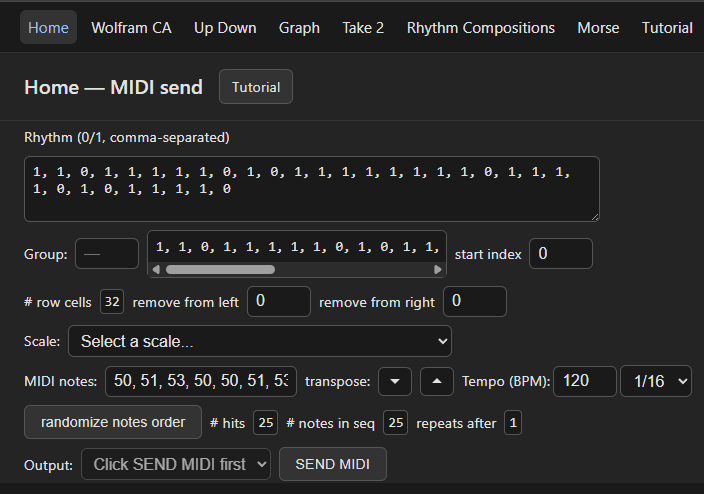
Home is where you assemble a rhythm plus a note sequence and send it out as live MIDI with the SEND MIDI button
other tools fill these fields for you, or you can type them directly
- Rhythm (0/1, comma-separated): the rhythm row, where 1 is a hit and 0 is a rest (e.g. 1, 0, 1, 1)
- Group: optional grouping number that visually chunks the 0/1 display; it does not change the rhythm
- start index: cyclically rotates the row so it begins on the chosen index
- remove from left / remove from right: trim that many cells off the start or end of the row
- # row cells: the resulting row length after trimming
- Scale / MIDI notes: choose a scale preset or type comma-separated MIDI note numbers (middle C = 60). These notes are cycled in order, one per hit (1) in the rhythm
- transpose down / up: shift every note by one semitone. randomize notes order: shuffle the note sequence
- Tempo (BPM) and note division (1/16, 1/8, 1/4): playback speed and how each rhythm cell maps to note length
- # hits, # notes in seq, repeats after: reference values. "# hits" is the number of 1s, "# notes in seq" is the number of MIDI notes, and "repeats after" is how many times the rhythm must cycle before the first note again lands on the first hit
- Output and SEND MIDI: pick your MIDI output device (it appears after the first SEND MIDI enables Web MIDI) and start playback; the button becomes STOP while playing. Keep the app at least partially in focus so MIDI timing stays accurate
Sending MIDI out (setup)
you need something on your device receiving MIDI
I use Ableton Live with VST plugins, and LoopBe30 to create the virtual MIDI ports
if you have no DAW, FluidSynth is a free cross-platform MIDI synth
- Windows: run choco install fluidsynth, then run fluidsynth to start the synth
- macOS: install with brew install fluidsynth or sudo port install fluidsynth
- Android: install the FluidSynth MIDI Synthesizer app (by Volcano Mobile) from the Google Play Store; it appears as an available MIDI output (a SoundFont .sf2 file is required)
- iOS: there is no standalone FluidSynth app. Instead install a MIDI synth such as NS MIDI Player from the App Store to act as the output, and open this app in a Web MIDI Browser (Safari does not support the Web MIDI API) so it can send notes to the synth
once you have internal MIDI ports available (e.g. via LoopBe30), the port will be selectable in the Output dropdown after you click SEND MIDI
1D Cellular Automata Midi Sequencer (Wolfram CA)
create rhythms from a horizontal cross-section (a row) of any of Stephen Wolfram's 256 elementary 1D cellular automata
this functionality was absorbed from the earlier standalone 1D Cellular Automata Midi Sequencer project
- Rule (0-255): selects the automaton. The rule visualization shows, for each of the 8 possible three-cell neighborhoods, what the cell below becomes on the next iteration (e.g. for rule 30, black/white/white becomes white). The Step, Reset, and Auto-run controls only drive this visualization
- Row: picks which horizontal row of the automaton to read as the rhythm; black cells become 1 (hit) and white cells become 0 (rest)
- Group, start index, remove from left/right, # row cells: shape the rhythm exactly like on Home (chunk the display, rotate the start point, trim either end, and view the length) so a row can be made to fit a desired bar count
- MIDI notes, Scale, transpose, randomize, Tempo, # hits / # notes in seq / repeats after: behave the same as on Home
- mirror rule / black-white swapped / reverse black-white swapped: the equivalent rules that produce related patterns, shown for reference
- Send rhythm to main and Send notes to main push the current rhythm and notes to the Home page; go to Home and press SEND MIDI to hear them
Up Down Midi Sequencer
many melodies are built by marching through a scale playing every other note, every third note, and so on, up or down
this tool gives you high-level control over that idea
the output updates automatically whenever scale, start note, repeats, and the row fields are all valid; fully blank rows are skipped
each row's "current note" chains from the start note and the previous row's calculated ending note
- scale preset / scale: choose a preset or enter comma-separated scale degrees. The start note transposes the whole scale to begin on that note
- start note: the first note of the sequence
- # repeats: how many times to repeat all row operations; the last row's "jump size to next operation" determines the starting note of the next pass
each row is one operation:
- # notes in operation: how many notes this operation produces
- step size: the jump (positive or negative) used to move through the scale. Example: a major scale 48, 50, 52, 53, 55, 57, 59 with step size 3 yields every third note 48, 53, 59, 64, 69, ...
- jump size to next operation: how far to move before the next operation's first note. Example: if the last note was 69 and the jump is -2, the next operation starts two scale degrees lower at 65
add or delete as many rows as you like
Send notes to main sends the sequence to the Home page; Send notes to Take 2 sends it into the Take 2 page's sequence 1 field for further manipulation
Graph Traversal Sequencer
draw a graph where nodes are MIDI notes and edges are allowed connections between notes, then generate note sequences from every path through the graph starting at a chosen node
this functionality was absorbed from the earlier standalone Graph Traversal Sequencer project
- Mode: NO DRAW (do nothing), ADD NODE (click empty canvas to place a node), ADD EDGE (click the originating node, then the destination node), REMOVE NODE (click a node to delete it and its edges), REMOVE EDGE (click originating then destination node)
- Graph: Directed adds the edge one way; Undirected adds it in both directions
- Start node index: the node the traversal begins from
- MIDI note per node: set a MIDI note for each node (defaults to its index; middle C = 60). Pick a scale preset to assign notes, or randomize notes order
- Generate sequence: finds all paths from the start node, each running until a dead end or until it revisits a node (cycle closure). Each path is listed separately and concatenated into the flattened output. Drag rows to reorder; the flattened output follows your ordering. # notes shows the total in the flattened result
- Adjacency matrix: a reference grid where each row's marked columns are the nodes reachable from that row's node
- Send notes to main / Send notes to Take 2 push the flattened sequence to Home or to the Take 2 page
Take 2 Sequences And Do A Bunch Of Stuff
hold two note sequences and apply operations to generate new ones
enter integers (typically MIDI note numbers) comma-separated into sequence 1 and sequence 2
related sequence-operation ideas also appear in the earlier Midi VST3 Plugin Multi Sequence Manipulator project; those kinds of operations are absorbed here in the Take 2 tool
Per-sequence operations
- Mod By Add By: apply "mod by" then "add by"
- Add By Mod By: apply "add by" then "mod by"
- Rotate Left
- Rotate Right
- Reverse
- Sum Inversion: uses the "sum inversion #"
- Tower of Hanoi It: uses "# discs t_o_h"
Replacement
- set "replace this" and "replace with" to define the find and replacement values
- apply replacement to sequence 1 or 2: replaces the matched values within that sequence
- replace with string sequence 1 or 2: writes the replaced result to the output
Both-sequence operations
- splice sequences: interleave the two sequences
- multiply sequences by scalars, add together, mod by: uses the two scalars and the shared "mod by"
Output and holds
- results land in the output box
- use the move buttons to push a value into sequence 1, sequence 2, or the two "hold this for a sec" slots
- every box has a Send notes to main button to push that value to the Home page
Rhythm Compositions
generate every ordered partition (composition) of a rhythmic space for a given number of hits
for example, a 5-cell space with 3 hits has these 6 compositions:
- [3, 1, 1] → [1, 0, 0, 1, 1]
- [2, 2, 1] → [1, 0, 1, 0, 1]
- [2, 1, 2] → [1, 0, 1, 1, 0]
- [1, 3, 1] → [1, 1, 0, 0, 1]
- [1, 2, 2] → [1, 1, 0, 1, 0]
- [1, 1, 3] → [1, 1, 1, 0, 0]
- rhythm space (1-16): the total number of cells (16th or 8th notes) the rhythm spans
- # of notes: the number of hits (1s); the rest are rests (0s). It cannot exceed the rhythm space
- Generate Rhythms: lists every composition for those values. Click any one to select it, or use Select Random
- Replace rhythm in main: overwrites the Home page rhythm with the selected one. Add to rhythm in main: appends the selected rhythm to the existing Home rhythm (the Home rhythm must already be valid 0/1 values)
Morse Code Rhythm Generator
turn text into rhythm by encoding it as Morse code and translating dots, dashes, and gaps into hits and rests
the idea comes from Rush's "YYZ", which encodes the letters Y, Y, Z in Morse and plays it as rhythm using 1 unit for a dot and 2 units for a dash, with no extra rest gaps; that is the default with the YYZ checkbox
- YYZ morse code: dot = 1, dash = 2, and none of the standard rest gaps
- Standard morse code: dot = 1, dash = 3, inter dot/dash gap = 1, inter letter gap = 3, inter word gap = 7 (standard Morse inserts these rests)
- All parameters are adjustable: Dot duration, Dash duration, and the toggleable Inter dot/dash gap, Inter letter gap, and Inter word gap (with their own durations), so you can experiment with non-standard configurations
- Text to encode: type any text. Unknown characters are skipped
- Generate rhythm: encodes the text and shows the Morse translation, the resulting 0/1 rhythm, and # hits / duration. Group chunks the rhythm display visually
- Send rhythm to main: replaces the Home page rhythm with this one